Overview
Custom wireless gimbal control system built around ESP32 controllers over CAN bus, enabling joystick PTZ, HTTP presets, and Stream Deck operation across multiple Ronin RS2 units in a portable broadcast rig.
Problem
DJI Ronin RS2 gimbals rely on the Ronin app and basic handle controls, which are not at all useful for live, multi-camera productions. However, due to their excellent stabilization, zoom/focus control, and the ability to handle the weight of most camera and lens combinations, they have the potential to become unobtrusive low-cost PTZ cameras. The goal was to create a deterministic, tactile control system that could scale across multiple gimbals, support diverse camera bodies, and integrate with a centralized control surface. Pair this with a compact video switcher like a Blackmagic Atem Mini Pro ISO and low-latency wireless transmitters, and you have a small and portable broadcast setup for any venue.
Hardware
- ESP32S3 controllers with SX1262 LoRa boards
- LoRa control link in the US ISM band (902–928 MHz), chosen to avoid crowded on‑set RF
- Digital potentiometers
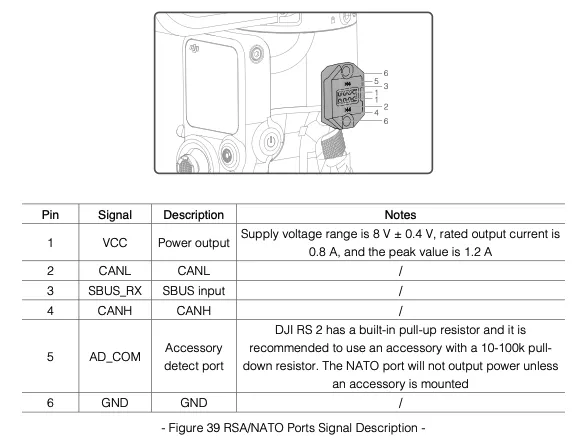
- SN65HVD230 CAN transceiver for RS2 accessory port communication
- 3-axis analog joystick with twist + deadman switch
- DJI Focus Motor repurposed as a zoom motor
- Stream Deck + Bitfocus Companion for operator control
- Interchangeable run/stop cables for multiple camera models
Protocol
Implements DJI R SDK v2.5 over CAN at 1 Mbit/s. Frames are reassembled from 8-byte CAN packets and validated with reverse-engineered CRC-16/CRC-32 parameters based on DJI demo code.
Common CAN Command Frames
Focus Motor Calibration (CmdSubID 0x02)
| Field | Type | Values |
|---|---|---|
| Command sub ID | uint8 | 0x02 (focus motor calibration) |
| Motor type | uint8 | 0x00 (focus motor) |
| Calibration command | uint8 | 0x00 no control · 0x01 auto cal · 0x02 manual cal · 0x03 reserved · 0x04 set min · 0x05 set max · 0x06 stop |
| Return | uint8 | 0x00 success · 0x01 failed |
Focus Motor Position (CmdSubID 0x15)
| Field | Type | Values |
|---|---|---|
| Command sub ID | uint8 | 0x15 (current position) |
| Motor type | uint8 | 0x00 (focus motor) |
| Endpoints status | uint8 | 0x01 no calibration · 0x02 calibrating · 0x03 calibration complete |
| Current position | uint32 | 0–4095 |
Third‑Party Camera Motion (CmdSet 0x0D, CmdID 0x00)
| Command | Value |
|---|---|
| Shutter | 0x0001 |
| Stop shuttering | 0x0002 |
| Start recording | 0x0003 |
| Stop recording | 0x0004 |
| Center focus | 0x0005 |
| End center focus | 0x000B |
Third‑Party Camera Status (CmdSet 0x0D, CmdID 0x01)
| Field | Type | Values |
|---|---|---|
| Camera status obtain | uint8 | 0x01 (query recording status) |
| Camera status | uint8 | 0x00 not recording · 0x02 recording |
SDK Reference
RS2 Control Block Diagram
Firmware Architecture
- Joystick processing with calibration, deadzones, and power-curve shaping
- CAN frame builder, RX reassembly, and robust error recovery
- ESP32 HTTP API with 30+ endpoints for presets and control
Key Features
- Velocity PTZ control at 12.5 Hz with axis-lock modes
- Preset recall (POS1–4) with smooth absolute-position moves.
- Zoom control via joystick twist and one-touch commands
- LoRa control is ideal for motion systems like this, removing long Ethernet runs when paired with long‑range low‑latency video links (e.g., Teradek 1000 XT)
- Sleep prevention and automatic wake handling
- Emergency stop + safety resume controls
Challenges
- Undocumented CRC parameters required reverse engineering
- CAN stability at 1 Mbit/s required careful pacing and recovery
- Focus motor operates open-loop via dial velocity commands
- RS2 aggressive sleep requires keep-alive strategies
Stack
ESP32, Arduino + ESP-IDF TWAI, C++, Bitfocus Companion, Stream Deck.
Outcome
Delivered a truly portable, broadcast‑grade PTZ system that replaces app‑based control with tactile operation, reliable presets, and centralized Stream Deck automation. It remains highly customizable because it supports the full DJI Ronin gimbal family and most camera/lens combinations, offering a clear advantage over typical PTZ systems that rely on smaller sensors, lower‑quality optics, or 1080p caps.
The closest comparable option is the Sony FR7, which offers similar capabilities but at a much higher cost and with a fixed‑sensor body.
Next Steps
Continue debugging the encrypted BLE connection to unlock deeper gimbal control (e.g., real‑time motor parameter changes), which currently live only inside the gimbal system rather than the CAN interface.