Overview
Full-featured POS with order tracking, customer accounts, pricing rules, analytics, hardware integration, and SMS notifications. Built with Flask + SQLAlchemy and deployed as a local server for reliability.
Background
I spent several months working at a friend's dry cleaning business in LA and saw firsthand how many problems came from bad software and non-integrated hardware. Many cleaners ran on Legacy POS systems from 2007 that were no longer being maintained. There was no solution to upgrade to newer systems too because there was no elegant way to transfer the old database to a new system. This store kept a bunch of spare parts for their old Windows XP machines because a single hardware failure could take the whole system down. There was no integrated customer communication, paper-based garment tracking, and no way to track machine status virtually. I built this to fix all of it.
Goal
Build a low-maintenance, local-first system that stays fast and dependable without cloud dependencies, flexible enough to adapt to the changing needs of a business, and easily transferrable to new hardware or systems.
Screenshots
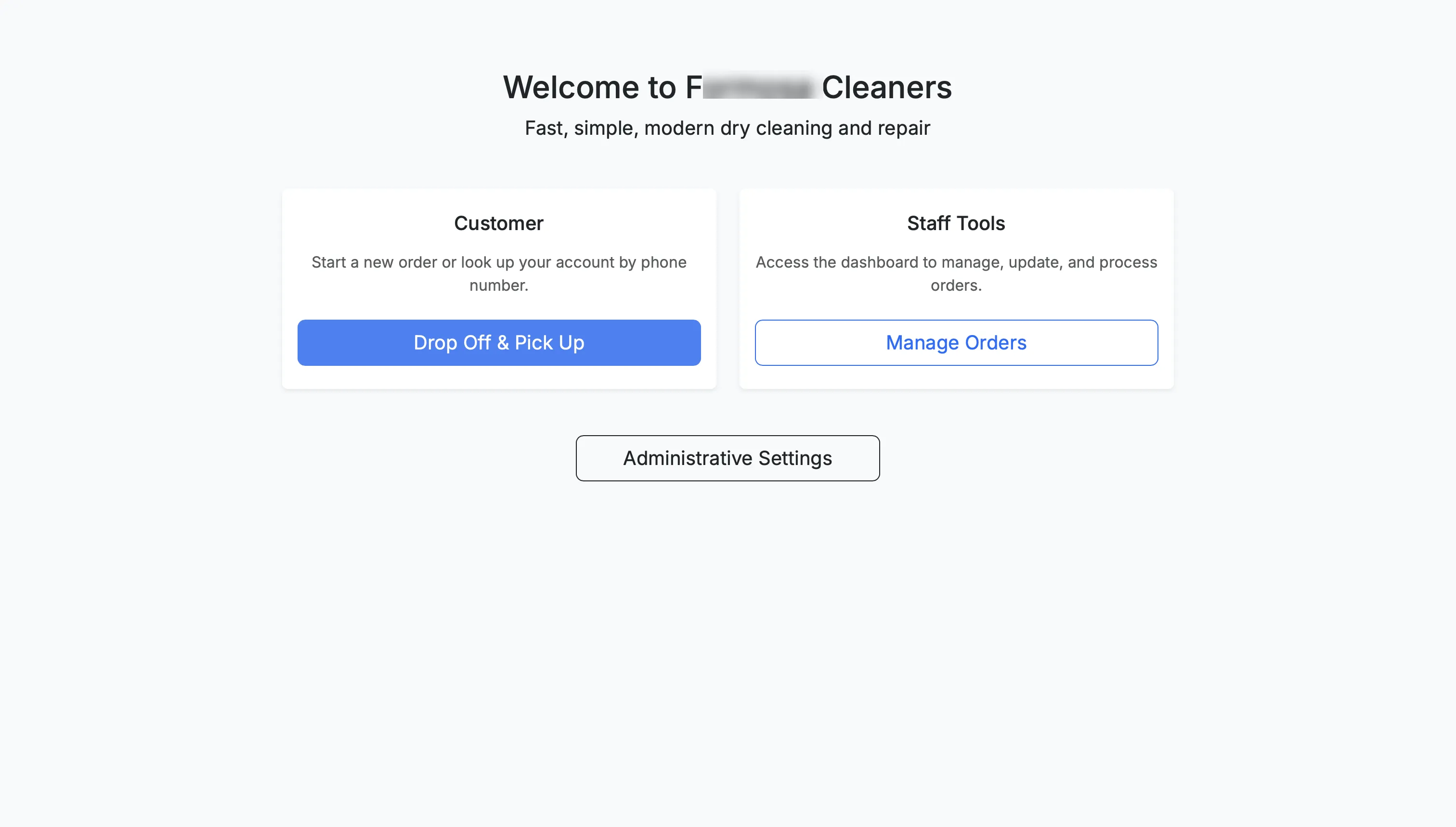
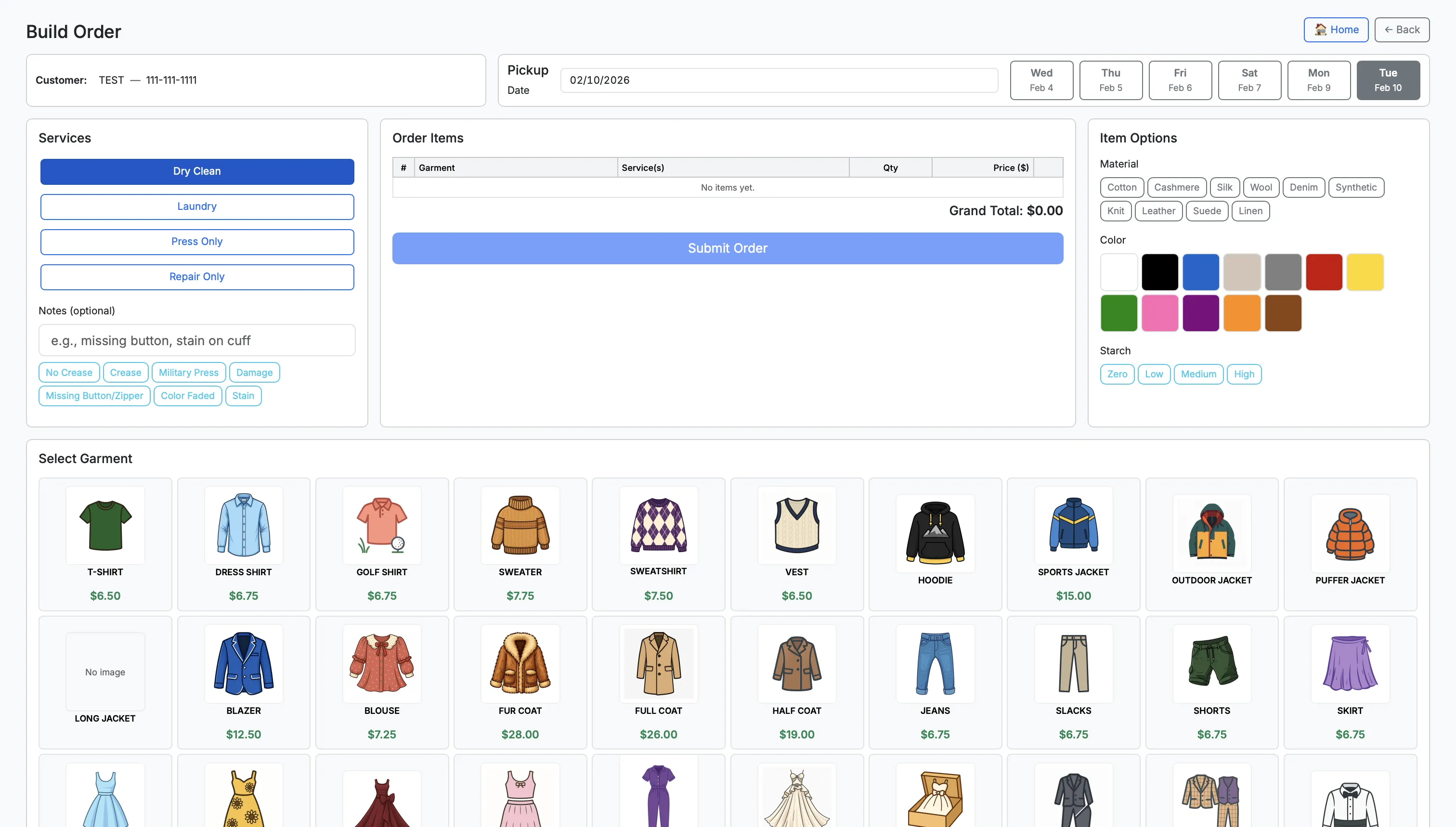
Core Features
- Order management from intake to pickup
- Customer accounts with credit balance and audit trail
- Multi-method payments (cash, card, credit)
- Dynamic pricing by garment and service type
- Analytics and reporting exports
- SMS notifications via Twilio
- Multi-station support (server, kiosks, scan stations)
System Architecture
- Flask app with SQLAlchemy ORM
- SQLite database in WAL mode
- Waitress WSGI server in production
- Bootstrap + vanilla JS front end
Hardware + Network Topology
Software Data Flow
Data Model (Summary)
- Customer → Order → Garment → GarmentService (pricing)
- Payment + CreditTransaction for balance and audit trail
- CashReconciliation for daily cash closeout
- Employee + TimeLog for staff tracking
Deployment Modes
- Server mode: main POS terminal (Waitress on port 5050)
- Kiosk mode: customer pickup stations (Chrome kiosk)
- Scan station: barcode intake workstations
- Development mode: Flask dev server
Sitemap Summary
- Public entry + health check
- Admin dashboard, settings, and employee management
- Customer management and order intake flow
- Order builder, confirmation, and payment processing
- Pickup kiosk + scan station workflows
- Reporting, cash reconciliation, and exports
- Printing pipeline and hardware services
Hardware Integration
- Full network infrastructure installed from scratch at each location. I installed on average over 1,000ft of ethernet per store, connecting every terminal, scanner station, kiosk, and printer
- Thermal label and receipt printers (Bixolon/Epson) via ESC/POS
- Network of Bluetooth barcode scanners installed throughout the store. Staff scan garments at each stage of the workflow, automatically triggering SMS updates to customers when their order is ready. launchd ensures scanners reconnect on boot without manual intervention.
- Cash drawer triggered via ESC/POS pulse commands on the receipt printer
- Credit card terminal integration
- Kiosk terminals: Raspberry Pi units running Chromium in kiosk mode, launched fullscreen on boot and polling until the Flask server is ready before opening
- Stations across locations run a mix of hardware, from Windows machines to low-cost Raspberry Pi kiosks. To bridge the Mac-hosted Flask server to Windows-based printers, a local print agent (FormosaAgent) runs as a lightweight HTTP server on each Windows machine. It accepts print jobs from the POS, renders receipt and label pages to PDF using headless Chrome or Edge, prints silently via SumatraPDF, and triggers the cash drawer via ESC/POS.
- Decoded undocumented serial command protocols from the diagnostic ports of dry cleaning machinery to surface real-time equipment status inside the POS: pressing machines, dry cleaning machines, MetalProgetti conveyor belt systems, and steaming machines. Each required its own protocol analysis: capturing raw serial traffic, identifying packet structure, and mapping status codes to meaningful states. The result is live machine status visible directly in the POS dashboard.
Scalability
Scales from a single‑terminal shop to multi‑station operations with self‑serve kiosks. Because the system runs on a dedicated in‑store VLAN, any worker can access the software instantly from any device on the network (phones, iPads, scan stations, etc.).
Deploying to a new location involves syncing the database from the development machine to the production server via SMB mount and rsync, with a controlled pause/resume workflow that stops the watchdog, creates a timestamped backup, syncs, and restarts all services — ensuring zero data loss during migrations.
Security & Privacy
- Local-first data storage with scheduled backups
- No customer data required to leave the premises
- Configurable roles and admin settings
Challenges & Lessons
- Legacy hardware and drivers across multiple printer models (it literally took me a week to get standardized receipts from a variety of printer models)
- No two dry cleaners run the same equipment, every location is a mix of old and new machinery, and each brand has its own undocumented serial command structure. There's no plug-and-play standard, which meant I had to manually decode serial commands to get data from each system per location based on whatever machinery that shop happened to have.
- Reliability under intermittent network and power conditions required a full resilience stack: a launchd watchdog daemon that polls the health endpoint and auto-restarts the service on failure, nightly SQLite backups uploaded to Google Drive via rclone with automatic 30-day pruning, scheduled server reboots after successful cloud backups, and a pause/resume sync workflow for safe database migrations without data loss. The system is designed to recover unattended from crashes, power cuts, and network drops.
- UX design for fast intake with minimal typing
Outcome
A stable, local POS platform that improves speed and reliability for daily operations while remaining flexible enough for shops of any size. 3 locations, running since mid-2025.
Next Steps
Continue expanding integrations (different laundry hardware, payment systems, printer models) and refine analytics/reporting workflows as the business grows. I'd also like to integrate with third-party delivery services one day.
Stack
Flask, SQLAlchemy, SQLite (WAL), Bootstrap, Waitress, Twilio.